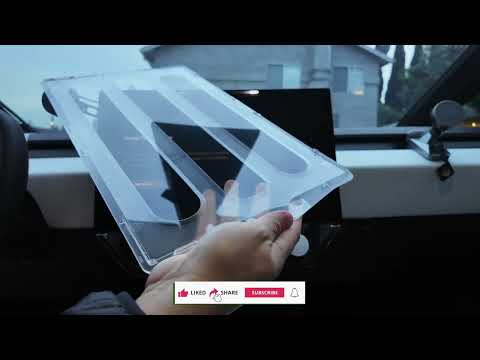
Hey everyone, DennisCW here! If you've just picked up your first Tesla—whether it's a Cybertruck, Model Y, or anything else—you're probably staring at that massive, gorgeous touchscreen wondering how to keep it pristine. Fingerprints? Scratches? We've all been there. Today, I'm diving into why I've always recommended the JOA matte screen protector over glossy ones, and I'll walk you through the super-easy install I just did on my Cybertruck.
The big debate: glossy (clear) or matte screen protectors? Glossy looks crystal clear... until your fingerprints turn it into a smudgy mess after two touches. Matte protectors like JOA's change the game. They drastically reduce fingerprints, making your screen stay cleaner longer. Clarity takes a tiny hit (barely noticeable), but the trade-off is worth it—especially on a daily driver like the Cybertruck.
JOA sent over their Cybertruck kit (fingers crossed for a Model Y Performance version soon), and after months of battling fingerprints on my naked screen, it was time. Pro tip: Don't wait like I did. I found light scratches and nicks already. Get protected ASAP!
Everything you need is in the box:
It's Tesla-model specific, so it fits perfectly. I've installed these on Model 3s and previous Model Ys—no issues.
 Unboxing the full kit—ready for action!
Picked up my Cybertruck from the car wash for a clean start. Here's how it went down:
Prep the Screen: Enable "Display Screen Clean Mode" in settings. Wipe with the included cloth and sunglass-style cleaner wipe (one swipe down—no scratching!).
Dust Check: Use dust absorbers and a flashlight to hunt for particles. Trapped dust = bubbles city.
Align & Apply: Peel the front liner off the protector. Use the alignment frame—line up the top, press center, swipe sides to tack it. Slowly peel the frame.
Bubble Buster: Keep the back liner on initially. Use the squeegee to push bubbles out. Heat from the sun/car will handle the rest.
Peel & Finish: Remove the back liner. Push any stragglers. Done!
The whole process? Under 5 minutes. Check out the matte finish in action—no greasy fingerprints even after handling.
 Left: Naked screen with fingerprints. Right: Matte perfection.
Standard phone mounts that clamp the screen? Big no-no with glass protectors—they sandwich and pressure the screen, risking cracks. That's why I love JOA's side-mounted foam mount. It attaches off to the side—no interference. I ditched my old center mount and wired up a passenger-side one instead.
 Side-mounted JOA mount = screen-safe victory.
Matte JOA screen protectors are a must for any Tesla owner. Less fingerprints, scratch protection, and easy install—what's not to love? Clarity is still sharp, and your screen stays looking new.
Grab yours via the link below (affiliate—thanks for supporting the channel!). What do you think—matte or gloss? Drop a comment, like, and subscribe for more Tesla tips.
Get the JOA Cybertruck Screen Protector Here
Drive safe, DennisCW

Tesla enthusiast and EV expert. Sharing tips on maximizing your Tesla ownership experience.